
Quiz vs. Calculator — Which Interactive Tool Will Pinpoint Your Perfect Career Path?
Nov 22nd, 2025
What Is a Career Quiz?
A career quiz is an interactive assessment—usually made of multiple-choice questions—that probes your interests, personality traits, values, and sometimes aptitudes. These quizzes are designed to help you reflect on who you are and what you might enjoy doing professionally. According to career-advice sites like Cleverism, quizzes help you understand “the types of work you most like doing” and uncover passions you may not’ve recognized. These quizzes are often free or very low-cost, and quick to complete, making them accessible for students, early-career professionals, or anyone curious about possible career directions.

What Is a Career Calculator?
A career calculator (or career path calculator) works more like a predictive tool. Rather than just giving you a list of roles, it combines your inputs—such as education level, experience, skills, and goals—with labor-market data and algorithms to forecast likely career paths, future roles, and milestones. For example, the BestColleges career path quiz (which has elements of a calculator) tells you the education, experience, and skill steps needed to reach a target role.
Some modern calculators also factor in emerging trends like job market demand, salary projections, and even AI stability (how resilient a job will be to automation).

Which One Should You Use — And When
3. Pros & Cons: Quiz vs. Calculator
| Tool | Advantages | Drawbacks |
|---|---|---|
| Quiz | – Helps with self-discovery (strengths + interests) – Fast, easy, very accessible – Great for early-stage exploration | – Can be oversimplified or generic – Might not reflect real job market trends – Results may be vague or feel “feel-good” rather than actionable |
| Calculator | – Provides realistic, actionable roadmaps – Uses real data (market demand, role predictions) – Ideal for planning education or career change | – More complex / time-consuming to fill out – Requires reliable data (may not account for niche careers) – Less focused on inner personality traits unless combined with quiz elements |
When to Use Each Tool

- Use a career quiz when all you really need is clarity on what you like or might be good at. If you’re exploring multiple fields or are unsure of where to start, a quiz can spark insight and give you some direction.
- Use a career calculator when you have a goal in mind — such as a dream position — and you want a step-by-step plan: what education, skills, experience, or certifications you’ll need.
- Ideally, combine both: first take a quiz to uncover your interests, then plug in your results into a calculator to chart a realistic career roadmap.
What’s New in 2025: Intelligent & Hybrid Tools
Career exploration tools are evolving rapidly: modern platforms are blending quizzes and calculators with AI, machine learning, and real-time job market analytics.

- Some systems (like those studied in recent research) use AI-powered simulations to mimic real career decision-making, making exploration more interactive and engaging.
- Others integrate psychometric analysis + machine learning to give tailored career advice that’s not just about personality, but also market demand.
- Many of the top assessment platforms now support customizable quizzes with different question types (interest, skills, values) and interactive reporting dashboards.
Practical Steps: How to Make the Most of These Tools

- Set a goal: Do you want insight or a plan? Your intention will guide which tool to choose first.
- Pick reputable tools: Choose platforms with transparent methodology. For quizzes: ProProfs offers a robust quiz maker with many career-assessment templates. For calculators: look for ones that use up-to-date labor market data.
- Reflect on your results: Don’t treat the outcome as the final answer. Use insights to explore job descriptions, talk to professionals, and test real-world options.
- Re-assess periodically: As your skills grow and the world evolves, so should your career plan. Revisit quizzes and calculators once a year to make adjustments.
- Seek human guidance too: Use the tool results as a starting point — a career coach or counselor can help you interpret insights and make informed decisions.
Conclusion
Quizzes and calculators each bring unique value to your career journey:
- Quizzes help you understand you.
- Calculators help you navigate the world.
In 2025, the best career-guidance experience comes from a hybrid: taking a quiz to build self-awareness, then leveraging a calculator to build a realistic roadmap. When combined thoughtfully, these interactive tools turn guesswork into strategy — guiding you not just to what you might like, but to what you can achieve.
Future-Proof Your Business with Incognitai
Stay ahead in the digital-first world with next-gen IT solutions and smart digital marketing strategies from Incognitai.
Empower your brand with technology that drives growth, efficiency, and future-ready innovation.
📧 Email: admin@incognitai.com
📞 Call: +91 99522 89956
Let’s engineer your IT future, today.

The Hidden Costs of Poor Automation: A Cost–Benefit Analysis for Startups
Nov 07th, 2025
Automation promises speed, scale and savings — and startups hear that message loud and clear. But automation is not an instant fix; done poorly it can quietly drain cash, slow growth and damage customer trust. For startups operating on tight runway and razor-thin margins, those hidden costs matter more than flashy headline savings. This deep dive unpacks where poor automation eats value, dispels common myths, and gives startup founders a practical framework to evaluate automation ROI within disciplined budgeting and the context of global automation trends.

Myths, Reality and the Real Price Tag
Myth 1 — “Automation always reduces headcount and saves money immediately.”
Reality: automation can reduce repetitive effort, but upfront costs and maintenance often negate short-term payroll savings. Startups commonly underestimate implementation costs (integration, testing, training) and overestimate immediate productivity gains. A shaky bot or a poorly designed workflow produces errors that require human fixes — creating a new cost center for exception handling.
Myth 2 — “Any process is a good candidate for automation.”
Reality: not every process deserves automation. Automating low-volume or frequently changing tasks costs more to maintain than the time it saves. The right targets are high-volume, stable, repeatable processes with clear rules and measurable outcomes.
The hidden cost categories startups usually miss
- Integration friction — connecting legacy tools, APIs or spreadsheets to an automation layer can require costly adapters and developer time.
- Monitoring & remediation overhead — failed runs create exception queues that employees must clear. If error rates are high, support costs spike.
- Data quality costs — garbage in, garbage automated. Cleaning data downstream or correcting automated outputs eats time and credibility.
- Technical debt & vendor lock-in — quick patches and customizations snowball into brittle systems; migrating later is expensive.
- Opportunity cost — misallocated engineering focus and budget might delay product features that directly grow revenue.
- Customer churn & brand damage — automation errors in customer-facing flows (billing, shipping, notifications) can erode trust faster than any single engineering sprint can repair.
Understanding these costs is step one. The next is quantifying them in dollars so you can make an honest ROI decision.
A Practical Cost–Benefit Framework for Startups

To decide whether to automate a process, use a simple three-stage filter that combines quantitative and qualitative checks.
Stage A — Measure the baseline
- Time per transaction (manual minutes/hours).
- Volume per month (number of transactions).
- Error rate today and the average time to fix an error.
Multiply to get current monthly labor cost and monthly remediation cost. Don’t forget hidden touchpoints — e.g. customer support following up on failed automation.
Stage B — Estimate automation investment
- Implementation cost = vendor fees + developer/integration hours + testing.
- Recurring costs = licensing, hosting, monitoring, and a modest SLA engineering cost to maintain automations.
- One-time migration or cleanup costs for data and process rework.
Create a realistic 12– to 24-month cashflow model: annualized savings from reduced manual time minus the sum of implementation + recurring costs. Include contingency (20–30%) for overruns — startups routinely underbudget for edge cases.
Stage C — Calculate true ROI and break-even
ROI = (Cumulative Benefits − Cumulative Costs) / Cumulative Costs.
Also compute time-to-payback (months until cumulative savings exceed cumulative costs). For startups, prefer automations with a payback under 9–12 months unless they unlock strategic advantages (e.g., regulatory compliance or enabling new revenue streams).
Strategy: How to Automate Smarter (Not Faster)

1. Adopt a test-and-scale approach
Run small, measurable pilots on one use case before company-wide rollouts. Use the pilot to validate error rates, remediation effort and impact on customer experience. Only scale when KPIs show durable gains.
2. Prioritize processes that compound value
Focus on automations that: improve revenue capture (billing reconciliation), reduce churn (faster onboarding), or unlock new product capabilities (real-time analytics). These deliver strategic ROI, not just cost cuts.
3. Build observability & guardrails from day one
Include monitoring dashboards, alerting on failure rates, and automatic rollback options. The faster you detect and mitigate failures, the lower your remediation cost. In short: automation must be treated like a production service.
4. Budget realistically — treat automation like product development
Line items should include integration, monitoring, maintenance and continuous improvement. Allocate a recurring maintenance budget (often 15–25% of the initial build cost annually) so the automation doesn’t become a neglected liability.
5. Keep humans in the loop for judgment work
Automate rule-based, repetitive tasks; keep humans for exceptions, empathy and strategic decisions. Hybrid workflows (automation + human review at defined checkpoints) reduce error cascades and preserve customer experience.
6. Watch global automation trends — and adapt
Global automation is moving beyond simple bots to AI-augmented orchestration and agentic systems. Startups should evaluate tools that support orchestration, observability and governance to avoid short-term wins that become long-term drains. Vendor maturity, security posture and data governance are now first-order selection criteria.
Conclusion — Automate with Humility and Precision

Automation can be transformational — but only when startups evaluate both sides of the ledger. The headline metric isn’t just “labor saved” but net value created after integration, maintenance, error remediation and opportunity costs are factored in. Use rigorous baseline measurement, conservative budgeting, small pilots and ongoing monitoring to ensure automation increases capacity and not risk.
For founders: treat automation as a long-lived product, not a one-off cost center. When done with discipline, automation improves margins, accelerates growth and gives startups leverage. When done hastily, it adds hidden costs that compound quickly. The smart path is to automate selectively, measure brutally and iterate relentlessly — that’s how automation becomes a growth engine, not a budget sink.
Future-Proof Your Business with Incognitai
Stay ahead in the digital-first world with next-gen IT solutions and smart digital marketing strategies from Incognitai.
Empower your brand with technology that drives growth, efficiency, and future-ready innovation.
📧 Email: admin@incognitai.com
📞 Call: +91 99522 89956
Let’s engineer your IT future, today.

Voice Search Optimization: Preparing Your Website for 2025’s Voice-First Era
Oct 24th, 2025
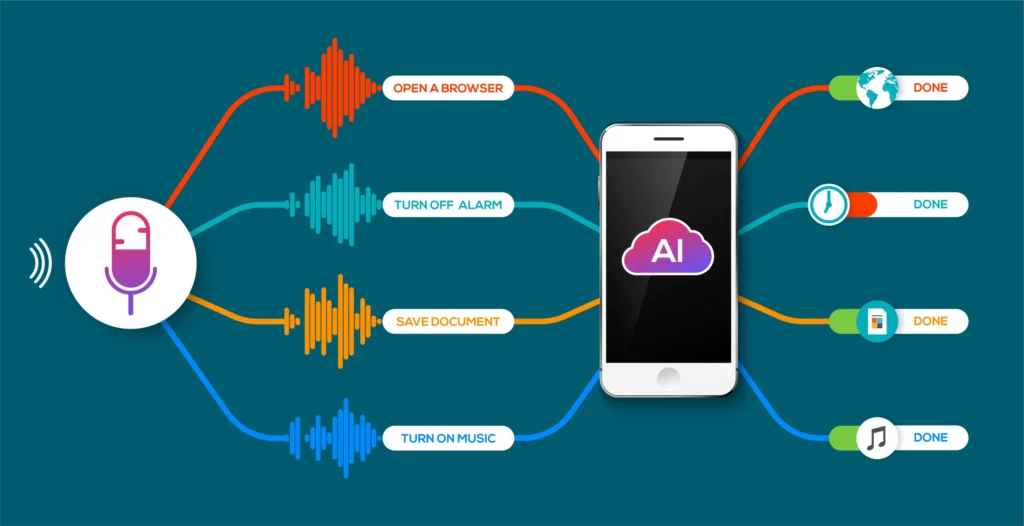
We used to type to be precise. Now we speak to be understood. Voice search has quietly moved from novelty to habit: smart speakers, phone assistants, in-car systems and voice in apps are all reshaping how people ask questions, find local businesses and make purchases. As of 2025 roughly one in five people worldwide regularly use voice search and the number of active voice assistants now towers into the billions — a signal that “voice” is no longer experimental, it’s mainstream infrastructure.

But adoption isn’t uniform. Use patterns vary by device, country and generation — and that disparity is an opportunity. Gen Z and younger Millennials are driving natural-language interactions (and will expect seamless voice experiences), while smart speaker ownership and voice shopping behaviour remain especially strong in certain markets. Understanding those differences helps you tailor the right voice strategy for your audience.
Why this matters for websites: voice queries are longer, conversational, and often phrased as questions — not short keyword fragments. In practice that means your content must be ready to answer real-world questions in a natural voice, deliver immediate utility, and load fast on mobile devices. The businesses that adapt will win the “spoken” moment of user intent.
The Practical Playbook: How to Optimize for Voice in 2025
Here’s a practical, high-impact plan you can implement this week and scale over time.
1) Think conversational, not terse
People ask full questions when they speak: “What’s the best budget CRM for small e-commerce stores?” or “Which cafes open early near Marina Beach?” Build content that answers those questions directly. Use natural, long-tail phrases and write Q&A style headings (Who/What/When/Where/Why/How). Pages that answer explicit questions clearly are most likely to be read aloud by assistants.
2) Prioritize featured/snippet-friendly structure
Voice assistants often read from SERP features: featured snippets, knowledge panels, or local packs. Make short, clear summary paragraphs (40–60 words) at the top of pages for common questions, then expand with detail below. Use numbered steps and bulleted lists for “how-to” instructions — these are easier for assistants to vocalise and for users to scan on mobile.
3) Schema, schema, schema
Structured data (FAQ, HowTo, Product, LocalBusiness, Speakable) helps search engines and voice platforms understand and extract precise answers. Implement relevant schema on question pages and local business listings to increase your chance of being the verbal answer someone hears. This is a technical lift with a big payoff.
4) Local + mobile first
Voice is wildly local: people ask for “near me” answers and then act (call, navigate, buy). Keep your Google Business Profile pristine (hours, menu, services, booking links), earn local citations, and make sure local pages load fast and speak plainly. On mobile, performance is the hidden ranking factor: faster pages rise in voice results.
5) Alexa & Assistant nuances (platform optimisation)
Each assistant has quirks. Alexa skills, Google Action integrations, and Siri shortcuts create branded voice touchpoints you can control. Alexa optimisation isn’t true SEO — it’s product design: build a helpful skill, make invocation names natural, and deliver utility in short voice-friendly interactions. Test your voice experiences across devices and keep the core information identical across platforms for brand consistency.
6) Measure what matters: queries, conversions, and voice funnels
Traditional pageviews are only part of the story. Track conversational queries, voice impression signals (SERP features), click-to-call and directions from local listings, and assisted conversions that started with voice. Build dashboards to see how voice contributes to leads and purchases and to identify friction points (e.g., unclear answers that cause follow-up queries).
Gen Z, Content Tone & Long-Term Voice Strategy
Gen Z behaviour: talk like a human, design like a product

Gen Z grew up in a multi-modal world — voice, short video, chat and search are blended for them. They expect speed and personality. Your voice content should be accurate and also reflect the tone your brand wants to convey: a helpful, concise answer with optional follow-up suggestions (“Would you like directions or open the menu?”). Create micro-conversations that anticipate follow-ups and offer an easy next step. Studies show younger cohorts are adopting voice quickly and will soon be a dominant voice audience — plan for that.
Content formats that win voice attention
- Q&A landing pages — each page answers one central question and related follow-ups.
- Conversational FAQ modules — short spoken answers and an “expand for details” web section.
- HowTo sequences — step-by-step instructions for tasks (recipes, setup guides, booking flows).
- Local quick cards — condensed pages for stores, services and events with structured opening times, contact and booking.
Voice commerce & discovery: be the trusted choice

Voice shopping is growing: people research with voice and then expect frictionless checkout. Ensure your product data is complete and that voice purchase paths (cart, payment intents, pickup options) are tested. Brand trust and clarity (pricing, returns) matter more when users can’t visually inspect options.
Futureproofing: AI, multi-modal voice and privacy
Voice tech is converging with generative AI and multimodal inputs (voice + image). Prepare by (a) making your content machine-readable via schema, (b) designing short, authoritative answers, and (c) respecting privacy — be clear about tracking and data use because voice interactions are intimate and regulations are tightening globally.
Final Checklist — Quick Wins for the Next 30 Days
- Audit your top converting pages for question-style queries; add short summary answers.
- Add FAQ/HowTo schema to 5 priority pages.
- Refresh your Google Business Profile with structured services and booking links.
- Build a one-minute Alexa skill or a Siri shortcut that answers a common customer question.
- Measure voice starts: track calls, directions, and voice query impressions in your analytics.
Voice search is not a single tactic — it’s a shift in how people expect answers. Treat voice like product design for information: clear, fast, and human. Do that, and your site won’t just survive the voice-first era — it will own the conversation.
Future-Proof Your Business with Incognitai
Stay ahead in today’s digital-first world with next-gen IT solutions and smart digital marketing strategies from Incognitai.
Unlock your brand’s potential with technology that drives growth, streamlines efficiency, and powers innovation for the future.
📧 Email: admin@incognitai.com
📞 Call: +91 99522 89956
Let’s engineer your IT success, today.

7 Dark-Web Horror Stories — and the Hard Lessons Every Cybersecurity Team Must Learn
Oct 08th, 2025
The dark web is no longer a fringe playground for shadowy actors — it’s where the biggest reputational, legal and operational risks lurk, and where routine breaches escalate into boardroom crises overnight. Below are seven real-world horror stories from the last two years, distilled into practical lessons your team can implement right away. Wherever possible the examples point to fresh, verifiable patterns: marketplaces getting seized or scamming their users, massive repackaged leaks, and threat actors weaponizing stolen data to scale social engineering. Each story closes with a crisp “what to do” checklist for security teams and career-track learners at Incognitai.

1) The Marketplace That Vanished — and Took User Funds With It
What happened: In mid-2025, one of the largest Bitcoin-enabled darknet marketplaces suddenly went offline in a likely “exit scam” — vendors and buyers lost funds and built trust evaporated overnight. That disappearance didn’t reduce criminal activity; users dispersed to other forums and mirrored services.

Lesson: Market infrastructure can collapse or be seized, but the underlying datasets and transaction trails live on. Monitoring marketplace closures is intelligence, not relief.
Action checklist
- Track marketplace mirror sites, withdrawal/escrow patterns and chatter about “exit plans.”
- Treat marketplace disappearances as high-value intel events — correlate with unusual credential dumps in your environment.
- Expand supplier-risk assessments to include “post-incident dispersal” scenarios.
2) The Repackaged Leak — Old Data Sold as New (and Trusted)
What happened: Threat actors frequently repackage old breach datasets (combine fragments, enrich with open data) and relist them as “very fresh” dumps — making detection and attribution harder. The 2025 AT&T-related dataset is an example of a large repackaged leak that circulated on Russian-language forums and raised authenticity/scale concerns.

Lesson: Not every “new” dump is freshly stolen — but every dump is dangerous. Attackers reuse old PII to mount convincing phishing, SIM swap, and account recovery attacks.
Action checklist
- Integrate historical breach databases in your intel pipeline to identify known/repurposed records.
- Harden account recovery and MFA flows against social-engineering using leaked PII.
- Use password-spray detection and logon risk scoring tied to known breached credentials.
3) The Big Claim: “1 Billion Records Stolen” (Truth vs Noise)
What happened: In 2025, cybercriminal groups made grand claims of enormous steals (e.g., alleged billion-record postings tied to cloud provider customers). Many such claims are amplifications or aggregations and require verification. Vendors sometimes confirm parts of the story while disputing other elements.

Lesson: Public, sensational claims are an intelligence signal — but verification matters. Misreading noise as fact leads to wasted response cycles and false alarms.
Action checklist
- Assign analysts to validate claims before triggering org-wide phishing responses; use multiple corroborating sources.
- Maintain a “confidence” score on external intel and route high-confidence items to incident response playbooks.
- Educate executives on evidence thresholds to avoid panic responses.
4) Law Enforcement Takedowns — Useful but Not Cure-All
What happened: Coordinated takedowns (Operation RapTor and other international actions) have disrupted large drug and data markets — yet the user base often fragments and resurfaces across smaller forums and encrypted channels. Law enforcement seizures are victories, but criminals adapt fast.

Lesson: A takedown reduces immediate volume but increases volatility and migration — which can make targeted customers and leaked datasets harder to track.
Action checklist
- After public takedowns, expand monitoring to emergent marketplaces and private forum recruitment channels.
- Expect an uptick in “panic selling” of stolen data — prioritize remediation for exposed customers/partners.
- Use takedown events as opportunity windows to hunt for indicators in logs (credential stuffing spikes, unusual API access).
5) Ransomware and Data-Leak Bluffs — The Emotional Extortion Play
What happened: Ransomware actors increasingly mix encryption with partial data leaks and public shaming on dark-web sites to coerce payment. Some groups post sample records or contact customers directly — amplifying pressure and legal exposure for organizations. Localized cases (including high-impact healthcare and municipal targets) show the same pattern: data leak + extortion = reputational cascade.

Lesson: Multifaceted extortion campaigns exploit fear. The presence of leaked samples is a high-urgency signal even if full datasets are not yet public.
Action checklist
- Prepare communications templates for customers, regulators, and press that are ready to deploy on validated leaks.
- Ensure legal and cyber insurance pipelines are exercised for leak + extortion scenarios.
- Prioritize containment of exfiltration paths (DLP, egress monitoring) and playbooks for “partial leak” incidents.
6) Human Error + Misconfigurations — The Dark Web’s Favorite Fuel
What happened: A majority of successful attacks in recent years trace back to human mistakes: exposed credentials, misconfigured cloud buckets, unpatched services and weak third-party controls. DBIR and industry trackers repeatedly underline that phishing and credential misuse remain dominant breach vectors.

Lesson: Technology alone won’t stop dark-web exposures. Attackers buy access cheaply; it’s the human and procedural gaps they exploit.
Action checklist
- Prioritize phishing-resistant MFA (FIDO2/Passkeys) and enforce least privilege on cloud workloads.
- Run continuous posture checks for cloud misconfigs and third-party API keys.
- Build a human-centric KPI for security training — track behavior change, not just completion rates.
7) Intelligence Integration Fail — When Dark-Web Signals Don’t Reach the Right Teams
What happened: Organizations often silo dark-web monitoring in threat-intel teams, but remediation requires cross-functional action (legal, comms, IR, vendor management). Reports advising pentesting + red-teaming integration show measurable reduction in reaction time when dark-web intel feeds into operations.

Lesson: Dark-web data is only valuable if it triggers concrete workflows inside the organization.
Action checklist
- Build automated alerting: map dark-web indicators to playbooks (e.g., leaked credentials → immediate MFA reset for affected accounts).
- Run tabletop exercises where dark-web intel initiates business decisions (customer notification, legal escalation).
- Train red teams to use dark-web findings to create realistic attack scenarios for blue teams.
Practical Roadmap: From Monitoring to Measurable Risk Reduction
- Tier your dark-web signals. Not every dump demands the same response. Use automation to tag confidence, relevance, and impacted business units.
- Enrich and act. Combine dark-web indicators with internal telemetry (auth logs, endpoint alerts, IAM changes) to prioritize incidents.
- Close the loop. When intel triggers remediation, log the action and feed outcomes back into the intelligence model — this reduces false positives over time.
- Think prevention, not just detection. Hardening account recovery, minimizing exposed PII, and locking down API keys make many dark-web threats non-actionable.
- Invest in people and process. Hire analysts who can triage dark-web chatter and embed playbooks across legal, comms, and operations.

Quick SOP (30-minute triage for a suspected leak)
- Verify — establish the source and confidence within 30 minutes. ComplexDiscovery
- Scope — map affected assets and customer populations.
- Contain — force resets / revoke API keys / block offending endpoints.
- Notify — legal + exec + comms if PII or regulatory risk exists.
- Hunt — search logs for exploitation indicators and lateral movement.
- Post-mortem — update intelligence taxonomies and playbooks.

Final Takeaway — Turn Horror into Homework
The dark web will keep producing scary headlines, whether marketplaces exit-scam, massive repackaged leaks resurface, or ransomware gangs publish samples. The winning organizations don’t chase every noise; they build disciplined pipelines that turn dark-web signals into prioritized, auditable actions across security, legal and customer teams. For Incognitai learners, mastering dark-web monitoring and global threat intelligence is more than a resume line — it’s the skillset that separates reactive responders from strategic defenders.
Future-Proof Your Business with Incognitai
Stay ahead in today’s digital-first world with next-gen IT solutions and smart digital marketing strategies from Incognitai.
Unlock your brand’s potential with technology that drives growth, streamlines efficiency, and powers innovation for the future.
📧 Email: admin@incognitai.com
📞 Call: +91 99522 89956
Let’s engineer your IT success, today.

5 Underrated Graphic Design Tools That Outperform Adobe in 2025
Sep 23rd, 2025
In 2025, the landscape of graphic design software is shifting fast. For decades, Adobe has set the benchmark; but now, several lesser-known tools are pushing boundaries—offering features, flexibility, and pricing models that in many cases outperform Adobe for specific users. This article explores five underrated alternatives, grouped by strength, and why each is worth a closer look.

1.Affinity Designer – The Powerhouse Vector/Raster Hybrid
Why it shines:
- Combines vector and raster workflows in one app, letting designers switch freely between pixel editing and scalable shapes.
- Supports AI-assisted tools, advanced color management, and non-destructive editing even when working with mixed media.
- Seamless import/export of common Adobe formats (PSD, AI, SVG, EPS), which eases migration or collaboration.

Where it outperforms Adobe:
- Cost: One-time purchase (no heavy subscription burden). Particularly strong value for independent professionals and small studios.
- Performance & speed: On many machines, Affinity’s recent versions feel leaner; its zoom, pan, and brush handling are smoother in common usage compared to some Adobe tools that can lag, especially on less powerful hardware.
- Precision tools for creatives: For illustrative work (comic art, logo work), Affinity’s brush engines, stabilization, dynamic symbols, and vector/raster blending give high control.
2. Inkscape + Boxy SVG – Open-Source & Browser-Based Vector Workhorses
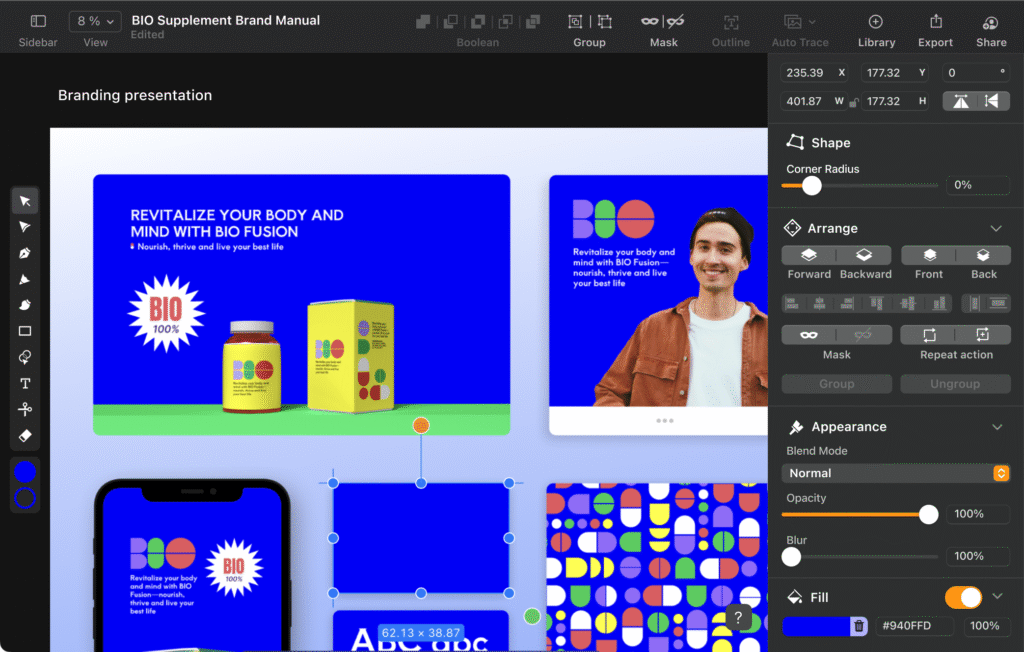
Inkscape: Key strengths
- Full-featured free/open-source vector editor, excellent for logo design, icon work, technical diagrams.
- Supports advanced path effects, mesh gradients, improved SVG2 and CSS support in recent updates.
- Cross-platform support (Windows, macOS, Linux, and even some mobile workflows) gives flexibility.
Boxy SVG: Key strengths
- Runs in browser and desktop, with minimal setup friction. Great for lightweight vector tasks.
- Clean UI focused on essential tools; users who want simplicity without sacrificing precision love it.
- Exports/imports standard vector formats, with good performance for web/vector workflows (SVG heavy).
What they beat Adobe at:
- Zero cost for many core features: No subscription needed for vector basics.
- Accessibility & portability: Designers can hop between devices or OSes without worrying about license conflicts or subscription fees.
- Lightweight yet capable: For many daily tasks (icons, web graphics, social media art), these tools are sufficient—and faster—than launching heavyweight Adobe apps.

3. Photopea – The Browser Photoshop Clone

Strengths:
- Runs entirely in browser; PSD compatibility is excellent. Layers, masks, blend modes, selection tools—all there.
- Good set of filters, transformation tools, basic AI/automation features for quick edits.
- Saves locally unless user chooses cloud storage, which gives control.
Why it’s competitive in 2025:
- For users without access to high-end machines or for quick edits on the go, Photopea reduces friction: no install, low startup overhead.
- Good answer for students, hobbyists, content creators who don’t need all of Photoshop’s enterprise or printing pipeline features but do need core image editing tools.
- Pricing model: free with ads or modest subscription for ad-free and extra features.
4. CorelDRAW Graphics Suite 2025 – All-in-One Designer’s Suite

What makes it stand out:
- A full design suite including vector illustration (CorelDRAW), photo editing (Photo-Paint), font management, mock-ups, layout features.
- AI-powered tools like bitmap-to-vector tracing (PowerTRACE) are strong; typical Adobe comparisons hold well here.
- One-time purchase license option is available, plus subscription models, giving flexibility.
Areas where it outshines Adobe:
- Better value for bundle users: One purchase gives wide functionality across vector, layout, image editing vs. paying separately for each Adobe app.
- Tools optimized for certain print and signage workflows: Especially useful in print shops, signage design, engraving/vinyl cutting where Corel has historically been strong.
- Performance tuning: Newer versions are optimized for modern OSes; color management, export to large files is improving.
5. Figma & Its Expanding Ecosystem – More Than Just UI Design

What’s new in 2025:
- Figma is pushing beyond UI/UX into branding, illustration, and marketing content via additions like Figma Draw, Figma Buzz, Figma Sites. These tools allow vector illustration, brand templates, and even website prototypes, or simple live sites integrated with design files. The Verge
- Real-time team collaboration, cloud version control, shared design systems give a productivity edge.
Why it surpasses Adobe for many workflows:
- Collaboration & speed: Multiple users can work at once; feedback loops are shorter. Teams distributed across different OSes or locations benefit heavily.
- Unified environment: Avoids jumping between Photoshop, Illustrator, InDesign for many tasks; saves time.
- Scalability & template reuse: Brand kits, variable fonts, CI/CD of styles/templates are easier.
Comparing Criteria: What Matters Most in 2025
To see why these tools are becoming preferred over Adobe in certain contexts, let’s examine what features matter increasingly:
| Criteria | Adobe Strengths | Where Alternatives Win |
|---|---|---|
| Cost & Licensing | Subscription model; frequently expensive for small businesses or individuals | One-time payments, free/open source, flexible subscription or tiered freemiums |
| Cross-platform & Accessibility | Strong platform support but sometimes heavy hardware requirements | Browser-based, lighter apps, good performance on lower-end systems |
| Specific Task Efficiency | Highly polished, deep toolsets for enterprise & print workflows | More streamlined for niche workflows—logo design, web graphics, quick edits |
| Collaboration & Template Ecosystem | Cloud-shared Adobe Libraries, but often separate apps for different tasks | Unified platforms (e.g. Figma) or shared assets that simplify brand alignment |
| Continuous Innovation | R&D and incremental updates—big new features are slower or spread across multiple apps | Some alternatives aggressively add new features like AI tools, better SVG support, live web export, etc. |
Potential Trade-Offs & When Adobe Still Makes Sense
While these tools offer strong competition, there remain cases where Adobe still holds advantages:
- Industry standard workflows in large print houses or publishing require Adobe file format fidelity, color profiles, or prepress capabilities.
- Very deep editing, content-aware and advanced masking, 3D tools, or high-end video/animation features are still stronger in Adobe’s flagship apps.
- Large existing teams accustomed to Adobe software; switching tools can incur learning or conversion costs.
Getting Started: How to Choose the Right Alternative
Here are steps or tips to picking a tool that might outperform Adobe for you:
- List core workflows — e.g. vector vs raster, print vs digital, mock-ups vs branding, social vs campaign design.
- Test trial/free versions — many tools offer trials/free tiers; test realistically (work on your actual style or project).
- Check format compatibility — if you work with clients or printers, ensure the tool supports their required file formats (PDF/X, color profiles, etc.).
- Consider support and community — open-source or smaller companies often have active communities, plug-ins, tutorials.
- Evaluate future needs — if you expect to expand into video, animation, or large campaigns, pick tools that are growing in those directions.
Why Underrated Means Opportunity
These tools are underrated often because:
- They lack Adobe’s brand dominance or marketing budget.
- Users may be biased toward what they already know (lock-in).
- Many alternatives haven’t yet matched Adobe in every dimension—so they’re seen as “good enough,” not “better.”
But in 2025, for many designers, “good enough” becomes “superior” in terms of value, speed, accessibility, and innovation.
Conclusion
Adobe remains a heavyweight in the design world, especially for large studios, print-centric work, and deep editing needs. But the gap is closing in specific areas—and for many users, Adobe’s disadvantages (cost, complexity, hardware demands) now outweigh its advantages. The five tools above—Affinity Designer, free/open-source vector tools (like Inkscape, Boxy SVG), Photopea, CorelDRAW, and Figma’s expanding offering—represent smart choices that in many cases outperform Adobe for everyday design workflows.
As tools evolve, the real winners will be those who pick tools aligned with their needs, not just chasing industry norms. The alternatives are no longer lurking; they are now front-runners in many design journeys.
Future-Proof Your Business with Incognitai
Stay ahead in today’s digital-first world with next-gen IT solutions and smart digital marketing strategies from Incognitai.
Unlock your brand’s potential with technology that drives growth, streamlines efficiency, and powers innovation for the future.
📧 Email: admin@incognitai.com
📞 Call: +91 99522 89956
Let’s engineer your IT success, today.

Quantum Computing for Beginners: How It Will Revolutionize Data Analytics
Sep 06th, 2025
Understanding Quantum Computing Basics
Quantum computing is more than just an upgrade of today’s computers—it’s a complete reimagining of how we process information. Traditional computers operate using bits, which can only be a 0 or a 1. Quantum computers, however, use qubits, which can exist in multiple states at once due to a principle called superposition. Add to that entanglement—where qubits influence each other no matter how far apart they are—and suddenly, computations that would take classical systems centuries could be completed in minutes.

This is why industries across the globe are closely watching quantum breakthroughs. From finance to medicine, quantum computing basics are becoming essential knowledge, as the technology promises to transform the way data is handled and decisions are made.
Quantum vs Classical Computing: The Big Shift
To grasp quantum’s power, it helps to compare it with classical computing. Classical systems are reliable, precise, and optimized for everyday tasks—but they struggle with problems that involve enormous datasets or complex patterns. Memory and processing power in classical machines increase only linearly with data growth.

Quantum systems, in contrast, scale exponentially. A small number of qubits can represent vast amounts of information, making them ideal for optimization, machine learning, and simulations that are beyond the reach of even the most advanced supercomputers. Of course, quantum hardware today is still in its noisy, experimental stage, facing challenges like error rates and fragile qubits. But progress is happening fast, and the promise of a quantum advantage—where quantum systems outperform classical ones—is drawing closer every year.
Global Data Trends Driving Quantum Adoption
Why is quantum computing creating such excitement? Because the world is drowning in data. Every day, billions of devices generate streams of information that businesses, governments, and researchers need to process. The scale of this data is simply too massive for classical computing to handle efficiently.

This is where quantum technology steps in. Countries are investing heavily to secure leadership in this field, while major corporations are pouring billions into research and development. Global market forecasts suggest quantum technologies will grow from a niche sector today to a multibillion-dollar industry in the next decade, transforming data-driven decision-making on a global scale.
Why Quantum Computing Matters for Data Analytics
For data analytics, quantum computing could be nothing short of revolutionary. Some of its most exciting applications include:
- Faster Pattern Recognition: Quantum algorithms can analyze complex, unstructured datasets much faster than traditional systems, enabling businesses to detect hidden trends or risks.
- Optimization at Scale: From logistics routes to investment strategies, quantum systems can evaluate countless possibilities in parallel, identifying optimal solutions far more efficiently.
- Predictive Modeling: Quantum machine learning models can train on massive datasets, reducing the time and energy required while increasing prediction accuracy.
- Advanced Simulations: In fields like healthcare, quantum computers can simulate molecular interactions at a depth impossible for classical systems, opening the door to faster drug discovery and material innovations.
- Data Security: With rising concerns about cyber threats, quantum technology also introduces quantum-safe communication methods that can protect sensitive information from future attacks.

Practical Access: Quantum-as-a-Service (QaaS)
One of the most exciting developments is that you don’t need your own quantum hardware to get started. Through Quantum-as-a-Service platforms, researchers, developers, and businesses can access quantum processors via the cloud. This democratization of technology means data professionals can begin experimenting with quantum algorithms today—building skills and insights that will be invaluable as the field matures.

Looking Ahead: The Road to Quantum Advantage
We are still in the early stages of the quantum journey, but progress is accelerating. Hardware stability is improving, error correction is advancing, and hybrid systems that combine classical and quantum computing are making the technology more practical for real-world tasks. Experts predict that within the next five to ten years, quantum computing will move from research labs into mainstream data analytics applications.

Why Incognitai Institute Is Preparing Now
For learners and professionals, understanding quantum computing basics is no longer optional—it’s becoming essential. At Incognitai Institute, integrating quantum concepts into analytics education will prepare students to work at the cutting edge of technology. By exploring both quantum vs classical computing approaches, engaging with hands-on projects, and leveraging global data trends, the institute can equip future analysts to thrive in a world where data and quantum insights go hand in hand.
Conclusion
Quantum computing is not just a buzzword—it is the next great leap in technology, with the power to reshape how we analyze and secure data. For beginners, learning these concepts now ensures they won’t just adapt to the future of data analytics—they will lead it.
Future-Proof Your Business with Incognitai
Stay ahead in the digital-first world with next-gen IT solutions and smart digital marketing strategies from Incognitai.
Empower your brand with technology that drives growth, efficiency, and future-ready innovation.
📧 Email: admin@incognitai.com
📞 Call: +91 99522 89956
Let’s engineer your IT future, today.

The Future of QA: Automated Testing Frameworks You Can’t Ignore
Aug 26th, 2025
In the evolving world of software development, quality assurance (QA) is no longer an afterthought—it’s a cornerstone of success. 2025 marks a transformative era for QA, where traditional tools are being redefined, replaced, or enhanced by smarter, more versatile frameworks. This blog dives into the revolution underway, spotlighting five next-gen automated testing frameworks poised to shape the future.

1. From Script to Smarter Bots: The Rise of AI-Powered Testing
Test automation is growing up. AI is bridging the gap between brittle scripted tests and adaptable, intelligent systems. Modern frameworks powered by machine learning can analyze UI changes, self-heal broken selectors, predict flaky interactions, and even suggest test cases based on app usage data. This shift means more robust, reliable testing—and less time spent on test maintenance.

2. Moving Beyond Selenium: What’s Next?
While Selenium has been the workhorse of web automation, newer tools are replacing and augmenting its functionality.
- Cypress launches with developer-friendly syntax and built-in time-travel debugging—ideal for fast-paced front-end workflows.
- Playwright takes it further, offering multi-browser, multi-platform support with automatic waiting and parallelism baked in.
- Puppeteer, with its headless Chrome control, supports ultra-fast navigation and scripting across modern web apps.

These Selenium alternatives are redefining expectations—promising faster tests, clearer debugging, and stronger cross-browser stability.
3. Beyond UI: Why API & End-to-End Frameworks Now Rule
Even as UI testing becomes smarter, foundational testing remains critical. Tools like Postman, RestAssured, and SuperTest enable developers to validate API endpoints with precision and ease.
For full-stack testing, hybrid frameworks such as TestCafe or Robot Framework combine UI, API, and logic validation. Unified pipelines ensure seamless, end-to-end coverage across both visual and backend layers—crucial for resilient, modern architectures.

4. Global Trends Redefining Testing Strategy
- Shift-Left Testing: Quality shifts upstream. Automated tests now run earlier in CI/CD pipelines, catching issues during development instead of after deployment.
- Low-Code Automation: Tools like Katalon and Tricentis Tosca empower business analysts and part-time testers to build automation without deep coding knowledge—breaking silos between teams.
- Crowdsourced & Cloud Testing: Platforms such as LambdaTest and BrowserStack offer massively parallel device testing in the cloud. Global test grids ensure your product works flawlessly across regions, devices, and browsers.

5. The Future QA Toolkit: What to Keep on Your Radar
| Framework / Trend | What Makes It Future-Ready |
|---|---|
| AI-driven systems | Auto-adapt tests, reduce fragility, suggest optimization points |
| Cypress, Playwright, Puppeteer | Faster, more consistent web automation and debugging capabilities |
| Unified stack (API + UI) | Full-stack validation—front-end to backend in one flow |
| CI/CD integration with shift-left | Earlier issue detection, faster feedback loops |
| Low-code and cloud-based testing | Democratized automation and scalable test execution |
Final Thoughts
QA in 2025 is no longer about manually scripting each test—it’s about embracing intelligent, scalable, and resilient automation frameworks. By combining AI, cloud infrastructure, and smarter tools, QA teams can deliver higher quality apps at faster speeds than ever before. Those who adapt now will lead the pack—others risk getting left behind.
Is your QA strategy built for the future?
Future-Proof Your Business with Incognitai:
Stay ahead in today’s digital-first world with next-gen IT solutions and smart digital marketing strategies from Incognitai.
Unlock your brand’s potential with technology that drives growth, streamlines efficiency, and powers innovation for the future.
📧 Email: admin@incognitai.com
📞 Call: +91 99522 89956
Let’s engineer your IT success, today.

Why Digital Marketing Needs AI Chatbots in 2025
Aug 13th, 2025
Amid the rapid modernization of digital outreach, AI chatbots have emerged as indispensable tools—especially in 2025. This shift is fueled by evolving customer behavior, new optimization strategies, and the rising power of automation.

1. The Chatbot Advantage: Drive Engagement and Nurture Leads 24/7
AI-driven chatbots are no longer simple FAQs—they’re becoming full-scale lead-generation engines. Available round the clock, they engage visitors in natural, dynamic conversations, qualify prospects instantly, and feed leads directly into your CRM. This level of automation has helped businesses boost lead capture and improve conversion efficiency dramatically. Chatbot-powered flows often outperform static forms or manual approaches.

2. A New Paradigm for Search: From SEO to GEO & AEO
Traditional SEO is being eclipsed by emerging approaches like Generative Engine Optimization (GEO) and Answer Engine Optimization (AEO). These strategies cater to AI-powered search behaviors, where users expect direct, conversational answers. Brands now compete in AI-generated answers, not just search rankings—meaning structured, concise, and fact-based content matters more than ever.

3. Elevating Customer Experience Through Conversational AI
2025 marks the era of conversational marketing. Chatbots and virtual assistants offer highly personalized, real-time interactions across websites, apps, and messaging platforms. They enhance CX by answering queries instantly, routing concerns intelligently, and nurturing leads with human-like empathy and efficiency.

4. Automation, Personalization & Global Reach
AI chatbots integrate seamlessly into broader marketing ecosystems—syncing with email platforms, CRMs, and analytics tools to deliver tailored campaigns at scale. Some support over 100 languages, unlocking global engagement. Businesses deploying chatbots see measurable gains in ROI, lead-quality improvement, and operational efficiency. For instance, Klarna’s bot managed 2.3 million chats in its first month, adding $40M in revenue.

5. Aligning with AI Trends in 2025
- AI-Powered Automation
Marketers across the globe are embracing AI tools for tasks like personalization, content creation, and predictive analytics—giving chatbot-driven systems a powerful edge. - Structured Data Meets AI Agents
The rise of AI agents and models means digital platforms must deliver clean, AI-ready content to remain discoverable. Brands with strong data infrastructure stand to win.
Key Takeaways: Why Chatbots Are No Longer Optional
| Benefit | Impact in 2025 |
|---|---|
| Instant Lead Capture | 24/7 engagement, qualification, CRM sync |
| AI-First Visibility | GEO/AEO-ready content for AI search |
| Scalable Personalization | Global reach through multi-language support |
| Workflow Automation | A unified, efficient marketing stack |
| Future-Proof Strategy | Strong data and structured insights drive AI relevance |
Final Thoughts
AI chatbots are reshaping digital marketing by blending automation with intelligence, personalization, and scalability. Whether turning visitors into leads, optimizing for AI-driven search, or delivering a seamless customer journey—these tools are fast becoming central pillars for modern marketing strategies.

As 2025 unfolds, organizations that adopt and refine AI chatbots will unlock superior engagement, efficiency, and competitive advantage—while those who hesitate may find themselves left behind.
Future-Proof Your Business with Incognitai
Stay ahead in the digital-first world with next-gen IT solutions and smart digital marketing strategies from Incognitai.
Empower your brand with technology that drives growth, efficiency, and future-ready innovation.
📧 Email: admin@incognitai.com
📞 Call: +91 99522 89956
Let’s engineer your IT future, today.

The Rise of Green Tech: How Cleantech Startups Are Shaping 2025
Jul 21st, 2025
In 2025, the global push for decarbonization has propelled cleantech startups to the forefront of innovation. These agile enterprises are not only addressing pressing environmental challenges but are also redefining industries through sustainable technologies and practices.

The Surge of Sustainable IT Solutions:
The digital transformation era has ushered in a heightened awareness of the environmental impact of IT infrastructures. In response, startups are pioneering energy-efficient data centers powered by renewable sources, optimizing software to reduce energy consumption, and implementing AI-driven systems to manage resources more effectively. These advancements are not only reducing carbon footprints but are also setting new standards for sustainable digital operations.

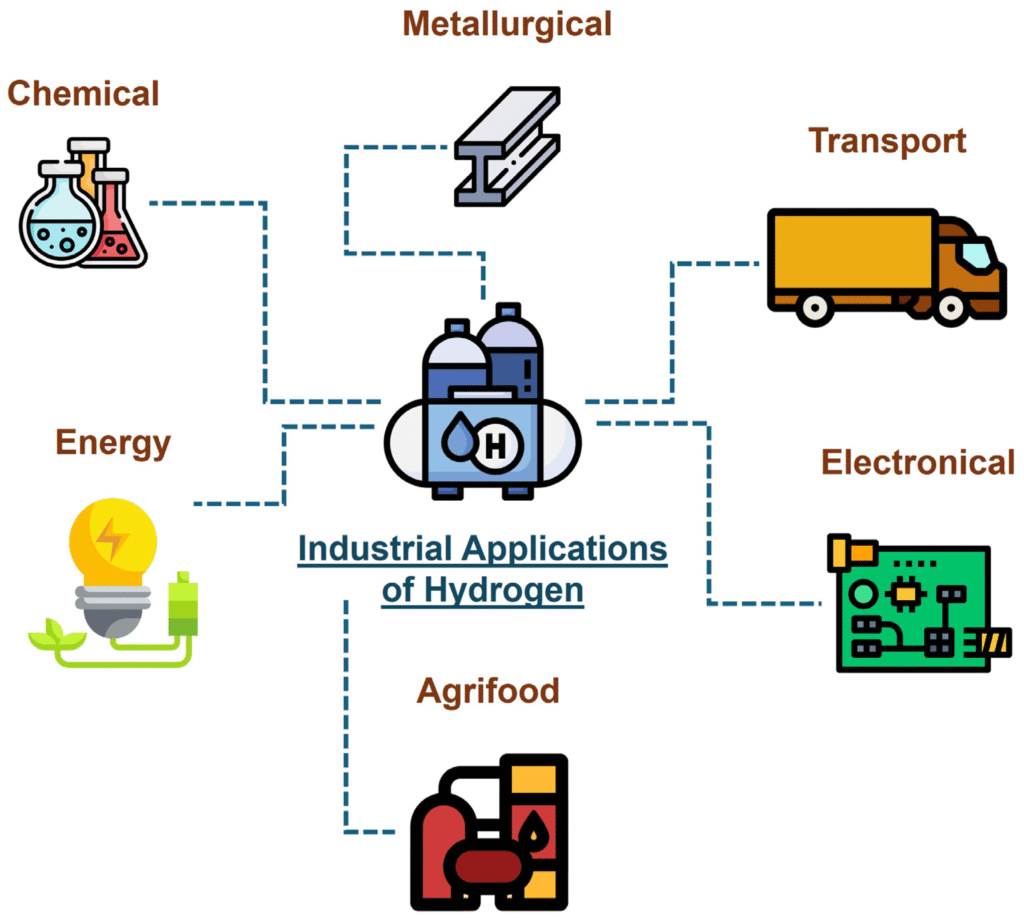
Green Hydrogen: Powering the Next Industrial Revolution:
Green hydrogen stands at the forefront of clean energy solutions. Produced through renewable-powered electrolysis, it offers a zero-emission alternative for sectors like transportation and heavy industries. Innovative startups are developing cost-effective electrolyzes and establishing hydrogen infrastructure, signaling a transformative shift in energy paradigms.
Global Cleantech Trends: A Unified Vision
The cleantech landscape is characterized by collaborative efforts and shared goals. Governments are implementing supportive policies, investors are channeling funds into sustainable ventures, and consumers are increasingly favoring eco-friendly products. This collective momentum fosters an environment where cleantech startups can thrive and scale their solutions globally.

Challenges and Opportunities Ahead:
While the cleantech sector experiences unprecedented growth, it also faces challenges such as regulatory hurdles and infrastructure limitations. However, these obstacles present opportunities for startups to innovate, form strategic partnerships, and influence policy-making. By navigating these complexities, cleantech startups contribute to environmental sustainability and drive economic growth.

Conclusion:
The ascent of cleantech startups in 2025 signifies a transformative period where innovation and sustainability converge. Through advancements in digital sustainability, green hydrogen technologies, and global collaborative efforts, these startups lay the foundation for a cleaner, more resilient future. As they continue to overcome challenges and seize opportunities, cleantech startups are poised to play a pivotal role in shaping a sustainable global economy.

Future-Proof Your Business with Incognitai:
Stay ahead in the digital-first world with next-gen IT solutions and smart digital marketing strategies from Incognitai.
Empower your brand with technology that drives growth, efficiency, and future-ready innovation.
📧 Email: admin@incognitai.com
📞 Call: +91 99522 89956
Let’s engineer your IT future, today.

Data Analytics in Healthcare: Predicting Disease Outbreaks with AI
Jul 05th, 2025
In an era where a virus can circle the globe in days, the ability to predict and prevent disease outbreaks is no longer a luxury—it’s a necessity. Artificial Intelligence (AI) has rapidly emerged as a game-changer in the world of healthcare analytics, offering unprecedented power to foresee health threats before they erupt. From detecting flu trends in a remote town to identifying early signals of a new pandemic, AI is quietly rewriting the rules of global health defense.

The Age of Proactive Healthcare

Traditionally, healthcare systems have been reactive—treating diseases after they emerge. But with AI-powered predictive modeling, we are witnessing a shift towards a proactive model. Instead of responding to outbreaks, we are beginning to anticipate them, allowing governments, hospitals, and even individuals to act in advance.
Predictive algorithms analyze vast datasets from a variety of sources: hospital records, public health databases, weather conditions, social media chatter, and even Google search trends. By spotting unusual spikes in symptoms or disease-related queries, AI can flag a potential outbreak before it becomes a headline.

Take the example of BlueDot, a Canadian health tech startup that flagged the outbreak of COVID-19 in Wuhan days before the World Health Organization made its official statement. Their AI scanned global airline ticketing data, news reports in multiple languages, and animal disease outbreaks to issue that early warning. This wasn’t science fiction—it was predictive analytics in action.
How AI Makes the Invisible, Visible
One of the key strengths of AI in healthcare is its ability to detect patterns invisible to the human eye. Diseases rarely appear suddenly; they often leave behind small signals—slight changes in symptoms reported, subtle shifts in regional health metrics, or small upticks in medicine sales.

By training machine learning models on historical data of known outbreaks, we can create robust systems that “learn” what early warning signs to watch for. For instance:
- Influenza Surveillance: AI can analyze pharmacy purchase data and emergency room visits to detect flu seasons weeks in advance.
- Vector-Borne Disease Predictions: By combining satellite imagery, rainfall patterns, and mosquito population data, models can predict dengue or malaria hotspots.
- Urban Health Monitoring: In cities, wearable devices and smart health sensors feed real-time data to models that flag abnormalities in heart rate, temperature, or respiratory function—critical during respiratory epidemics.
Challenges in the Data-Driven Revolution
Despite its promise, the journey isn’t without roadblocks. Privacy concerns remain a major hurdle—health data is sensitive and heavily regulated. Moreover, AI models are only as good as the data they are trained on. Biases in healthcare data, underrepresentation of rural or low-income populations, and noisy datasets can result in skewed predictions.

Additionally, predictive systems must be paired with strong response frameworks. Knowing about an outbreak ahead of time is useless if public health agencies don’t have the tools or resources to act quickly.
The Future: AI + Human Intelligence
The ultimate goal isn’t to replace epidemiologists or public health experts, but to empower them. AI excels at processing billions of data points in seconds—but it lacks context and human intuition. A hybrid model where machines alert and humans interpret is the most powerful approach.

Healthcare systems worldwide are slowly beginning to integrate AI tools into their outbreak management strategies. From smart dashboards that visualize disease trajectories to mobile apps that track symptoms and exposure risk in real-time, the AI-healthcare fusion is no longer confined to labs or pilot programs—it’s happening now.
Conclusion: Predicting to Prevent
As AI in healthcare matures, we stand at the brink of a global transformation. The ability to predict disease outbreaks before they spiral out of control could redefine the future of public health. From mitigating pandemics to safeguarding underserved regions, predictive analytics is quietly saving lives—often before we even realize we’re at risk.

AI is not just about data. It’s about decisions. It’s not just about prediction—it’s about prevention. And in that lies its greatest promise for the future of global health.
Future-Proof Your Business with Incognitai:
Stay ahead in today’s digital-first world with next-gen IT solutions and smart digital marketing strategies from Incognitai.
Unlock your brand’s potential with technology that drives growth, streamlines efficiency, and powers innovation for the future.
📧 Email: admin@incognitai.com
📞 Call: +91 99522 89956
Let’s engineer your IT success, today.